It’s really nice to have your own clock source, but when you start digging into the price of those units, saying you might not get change from $13,000 isn’t a lie. Of course, that’s for the highest end cards - but do we really need that for a small user? What if you could get most of the way there for about $50 USD installed?
Good news - you can.
The idea is to use one of these GPS recievers with a little bit of level conversion and hook it straight into your serial port. It’s exactly the same method as when I did this about 8 years ago - however the tooling has changed a little since then - so lets revisit this topic with some modern tools.
We’ll be using chronyd as our NTP time server - as its pretty much the default everywhere these days, along with gpsd and its
tools to configure the module properly.
What you’ll need:
- UBX-M8030-KT type GPS reciever
- Dual Channel RS232 to TTL module
- DB9 serial port connector
- 5v power source
Looking at the GPS module, you’ll see it’s pretty straight forward. TX / RX for serial data, PPS for the pulse, and power.

Here’s a quick picture of my plug wiring. In my setup, my RS232 port allows me to inject 5vDC on pin 9 of the DB9. You probably won’t have this, so you’ll need to supply 5vDC to the VCC pad on the converter - which also connects to the GPS Vcc - and one of the GND pads on the board. It’s important that the serial port ground, the power supply ground, and the level converters grounds are all connected.
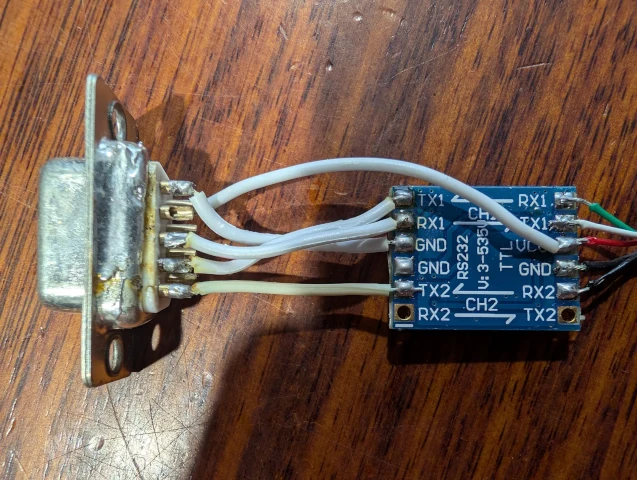
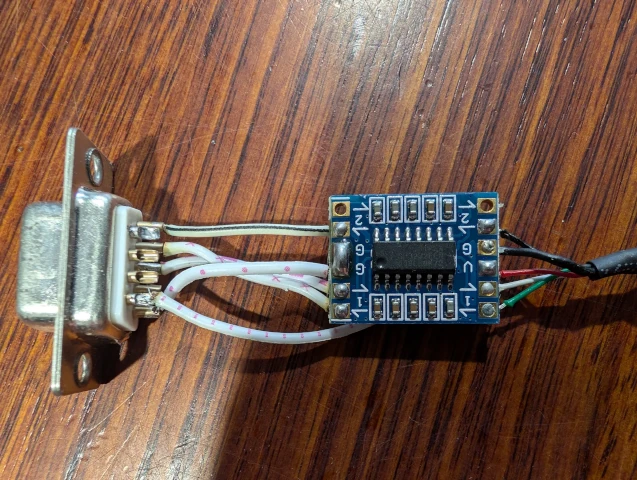
On the hardware side, that’s pretty much it - so now, lets set up the software.
I installed mine on a Proxmox server - so everything here is based on a Debian install. These tools are generic, so search for them on your distro.
Firstly, install the required packages:
1
2
# apt-get update
# apt-get install gpsd gpsd-tools setserial chrony
Now, to configure gpsd, edit the file /etc/default/gpsd, and make its contents as below. Subsitute your serial port instead of /dev/ttyS0.
1
2
3
4
5
6
7
8
9
10
# Devices gpsd should collect to at boot time.
# They need to be read/writeable, either by user gpsd or the group dialout.
DEVICES=""

# Other options you want to pass to gpsd
GPSD_OPTIONS="-n"
OPTIONS="-s 38400 -F /run/gpsd.sock /dev/ttyS0"

# Automatically hot add/remove USB GPS devices via gpsdctl
USBAUTO="false"
Now we’re going to want to edit the gpsd systemd service to add some commands to initialise the GPS module on startup.
Do this via systemctl edit gpsd and add in the following - again, alter your serial port as required:
1
2
3
4
5
6
7
[Service]
ExecStartPre=/usr/bin/setserial /dev/ttyS0 low_latency
ExecStartPre=/usr/bin/ubxtool -f /dev/ttyS0 -P 18 -s 9600 -S 38400
ExecStartPre=/usr/bin/ubxtool -f /dev/ttyS0 -P 18 -s 38400 -p MODEL,2
ExecStartPre=/usr/bin/ubxtool -f /dev/ttyS0 -P 18 -s 38400 -e BINARY
ExecStartPre=/usr/bin/ubxtool -f /dev/ttyS0 -P 18 -s 38400 -d NMEA
ExecStartPre=/usr/bin/ubxtool -f /dev/ttyS0 -P 18 -s 38400 -e PPS
Finally, we set up chronyd to use both the GPS and PPS output. Edit /etc/chrony/chrony.conf and add this at the bottom:
1
2
3
4
5
refclock SHM 0 refid GPS offset 0.600 delay 0.2
refclock SHM 1 refid PPS offset 0.0 delay 0.0

server pool.ntp.org iburst
allow 10.0.0.0/24
In this config, we deliberately add an error to the GPS lines. This is because the NMEA data can be quite regular, and in some cases people have seen it being preferred as a source over the PPS. Inducing an error here will ensure that we always use the PPS source.
The last two lines allow your network to use the chronyd instance as an NTP source and sets an external reference to start against.
Now to configure these services to start on boot, and start them now:
1
2
# systemctl enable gpsd chronyd
# systemctl restart gpsd chronyd
If you then watch the logs in journald, you’ll see something like this:
1
2
3
4
5
6
7
systemd[1]: Starting chrony.service - chrony, an NTP client/server...
chronyd[1084]: chronyd version 4.3 starting (+CMDMON +NTP +REFCLOCK +RTC +PRIVDROP +SCFILTER +SIGND +ASYNCDNS +NTS +SECHASH +IPV6 -DEBUG)
chronyd[1084]: Frequency -12.140 +/- 0.070 ppm read from /var/lib/chrony/chrony.drift
chronyd[1084]: Using right/UTC timezone to obtain leap second data
chronyd[1084]: Loaded seccomp filter (level 1)
systemd[1]: Started chrony.service - chrony, an NTP client/server.
chronyd[1084]: Selected source PPS
I then use this command to watch what’s going on: watch "chronyc tracking; echo; chronyc sources; echo; chronyc sourcestats"
You can check the accuracy in this by looking at this bit:
1
2
3
4
Name/IP Address            NP  NR  Span  Frequency  Freq Skew  Offset  Std Dev
==============================================================================
GPS                         7   3    90    +19.721     89.013   -382ms   664us
PPS                        64  31  1001     -0.000      0.071   -147ns    48us
Job done. Enjoy your very cheap stratum 1 NTP server.
]]>